This article was originally written and published in Bangla by one of our very own Senior Software Engineers on LinkedIn. If you want to read the original version, please find it here: https://www.linkedin.com/pulse/event-driven-architecture-eda-sodipto-saha-chftc/
What is EDA?
Key Characteristics
- Loose Coupling: Services do not make direct calls to each other.
- Asynchronous: The event is published immediately, and subscribers process it later.
- Scalable: High volumes of events can be handled using queues or streams.
- Resilient: If one service fails, others can continue operating uninterrupted.
Core components of EDA
Event Producer (Publisher)
- Role: Generates and publishes events.
- Example: The Order Service publishes an OrderCreated event when a new order is placed.
Event Channel / Event Bus / Message Broker
- Role: Stores events and delivers them to subscribers.
- Examples: Apache Kafka, RabbitMQ, AWS SNS/SQS.
- Benefits: Guarantees event delivery and handles routing.
Event Consumer (Subscriber)
- Role: Subscribes to events and performs necessary tasks.
- Examples: Payment Service, Notification Service, Analytics Service.
- Benefits: Allows services to process data independently.
Event Store (Optional)
- Role: Logs every event that occurs in the system.
- Benefits: Simplifies auditing, provides historical insights, and enables easy system recovery.
How EDA works
Step 1: Event Triggering
Step 2: Event Publishing
Step 3: Event Routing
Step 4: Event Consumption
Step 5: Event Chaining (Optional)
Step 6: Error Handling
Step 7: Audit / Replay (Optional)
Event-driven E-commerce order lifecycle
Today, by discussing the steps that occur after placing an order on an e-commerce website, we will learn how EDA (Event-Driven Architecture) works. Additionally, we will explore the key benefits of using EDA.
Suppose you have placed an order. Our system will first validate the order through an API. If the order is valid, it will be placed; if there is an issue, the user will receive an error message.
Once the order is successfully created, the following steps will take place sequentially.
- OrderCreated: A new order has been created.
- Order Confirmed/Order Cancelled: The order will be confirmed or cancelled.
- Send Payment Initiation Link: If the payment is incomplete, a payment link will be sent to the customer.
- Send Notification to User: An order-related notification will be sent to the customer.
- Send Email to User with Invoice: An email containing the invoice will be sent to the customer.
- InventoryAdjusted: Inventory or stock will be adjusted according to the order.
- Shipment Created: A shipment will be created for the order.
- Store Order Analytic Data: Order-related data will be stored in the analytics system for future analysis.
1. Order Created
- Event: OrderCreated
- Trigger: Customer places a new order.
- Subscribers:
- Order Confirmation Service: Validates the order.
- Analytics Service: Logs order data.
- Benefit: The customer receives immediate acknowledgment while services process tasks concurrently.
2. Order Confirmed/Cancelled
- Event: OrderConfirmed/OrderCancelled
- Trigger: Published after order validation.
- Subscribers:
- Payment Service (Confirmed only):Sends a payment initiation link.
- Notification Service: Informs the user of their order status.
- Benefit: A failure in one service does not affect others.
3. Payment Initiated
- Event: PaymentInitiated
- Trigger: Published when the customer begins the payment process.
- Subscriber:
- Notification Service: Keeps the user informed about the payment status.
- Benefit: The user isn’t kept waiting on a frozen screen, and retries are easy to manage.
4. Payment Succeeded
- Event: PaymentSucceeded
- Trigger: Payment is completed successfully.
- Subscribers:
- Invoice Service: Generates and sends an invoice.
- Inventory Service: Updates stock levels.
- Shipment Service: Creates a shipment record.
- Benefit: Tasks execute independently without degrading performance under high load.
5. Notification Requested
- Event: NotificationRequested
- Trigger: A service requests that a notification be sent.
- Subscriber:
- Notification Service: (Sends SMS, email, or push notifications asynchronously).
- Benefit: Prevents the main order flow from slowing down.
6. Invoice Delivery
- Event: InvoiceRequested → InvoiceSent
- Trigger: Invoice generation completed.
- Subscriber:
- Email Service: Delivers the generated invoice to the customer.
- Benefit: Asynchronous delivery ensures zero delay in the core user experience.
7. Inventory Adjustment
- Event: InventoryAdjusted
- Trigger: Published when an item’s stock count changes.
- Subscriber: Warehouse / Stock Management Service.
- Benefit: Reduces race conditions and prevents services from waiting on database locks.
8. Shipment Created
- Event: ShipmentCreated
- Trigger: Shipment is prepared.
- Subscribers: Notification Service, Logistics Service.
- Benefit: Updates the user asynchronously while keeping shipment retries independent.
9. Analytics
- Events: OrderCreated, OrderConfirmed, PaymentSucceeded, ShipmentCreated
- Subscriber:Analytics Service.
- Benefit: Aggregates data from multiple events for real-time insights without slowing down core services.
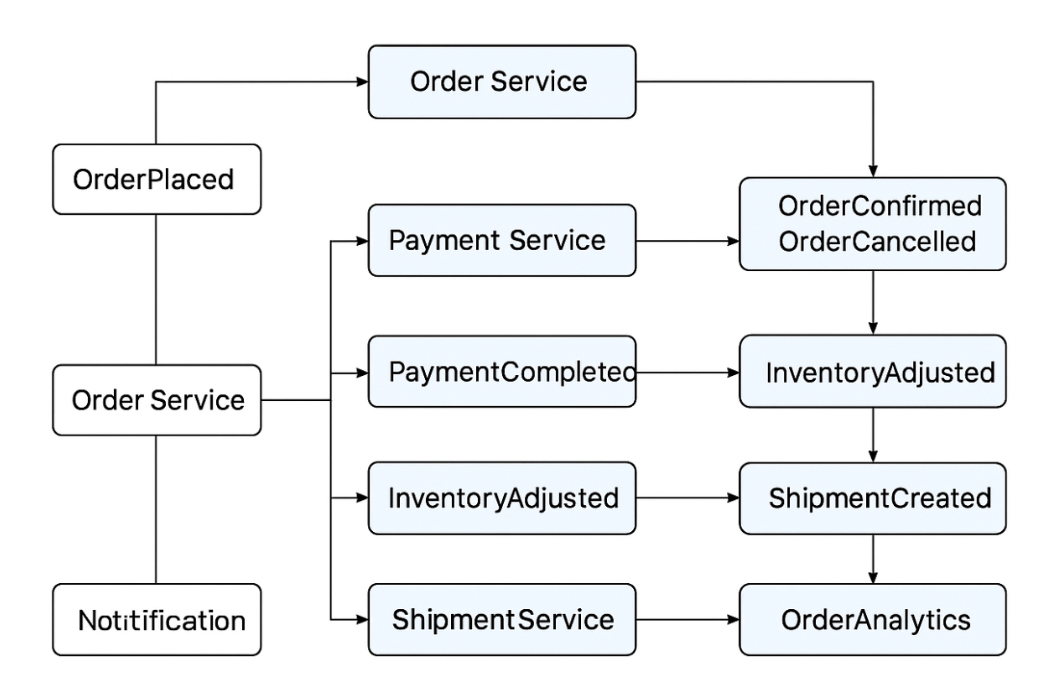
Here, we demonstrated how an order’s entire lifecycle unfolds through events. Every single task occurs via events, with distinct services (including microservices) completing these tasks by subscribing to those events. As a result, no service has to wait for another, and this is precisely what Event-Driven Architecture (EDA) is.
Key benefits of Event-Driven Architecture
- Loose Coupling: Services are independent; a failure in one won’t crash others.
- High Scalability: Asynchronous processing enables systems to handle sudden traffic spikes smoothly.
- Better Performance: Processing speed increases because services don’t wait for synchronous HTTP responses.
- Flexibility & Extensibility: New features or services can be added without modifying existing core code.
- Fault Tolerance: Failed events can be safely retried without bringing down the whole application.
- Real-Time Processing: Events are processed immediately upon occurrence, enabling faster decision-making.
- Reduced Latency: Users get rapid response times because heavy tasks execute in the background.
- Auditing & Analytics Friendly: Event logging simplifies compliance, debugging, and historical data analysis.
- Decoupled Development: Multiple engineering teams can work on individual services independently.
- Resilient System Design: Gracefully handles partial failures without complete outages.
Popular & widely used Event Driven Architectures
- Apache Kafka: High-throughput event streaming platform
- RabbitMQ: Lightweight message broker (pub/sub + queue)
- AWS SNS & SQS: Fully managed event pub/sub + queue service
- Google Cloud Pub/Sub: Scalable distributed messaging service on GCP
- Azure Event Grid: Fully managed event routing service for the Azure ecosystem.
- NATS: Ultra-high-performance messaging system designed for microservices.
- Redis Streams: Lightweight, built-in event streaming feature inside Redis.