This article was originally written and published in Bangla by our very own Senior Software Engineer Sodipto Saha on LinkedIn. If you want to read the original version, please find it here: https://www.linkedin.com/pulse/aws-sqs-simple-queue-service-deep-dive-sodipto-saha-ivjqc/
What is SQS?
AWS SQS (Simple Queue Service) is a fully managed, highly scalable message queuing service from Amazon. It is a place where different components of your application can send messages to each other. Amazon SQS is essentially a pull-based service, meaning consumers must actively retrieve messages from the queue. It does not automatically send messages to the consumers.
In simpler terms,
Why is SQS so important?
Decoupling
Massive Scalability
Reliability
There is no data loss. If a message is not delivered, SQS retries.
Ideal for High-traffic Apps
Cost Efficient
You are billed based on usage with the pay-as-you-go model.
Today, we will learn about SQS in detail. We will discuss how SQS works, why SQS is used, and what kind of benefits can be gained by using it. Additionally, we will see how I have implemented SQS in real-world software.
How does AWS SQS work?
AWS SQS is a distributed message queuing system where different parts of an application exchange messages through a queue instead of communicating directly. This makes the application more flexible, fault-tolerant, and scalable.
Producer (Message sender)
SQS Queue (Temporary message storage)
The Queue holds the message until someone processes it. Here,
- Messages don’t get lost
- They remain in sequence (guaranteed if using FIFO)
- Multiple consumers can process messages simultaneously
Consumer (Message processor)
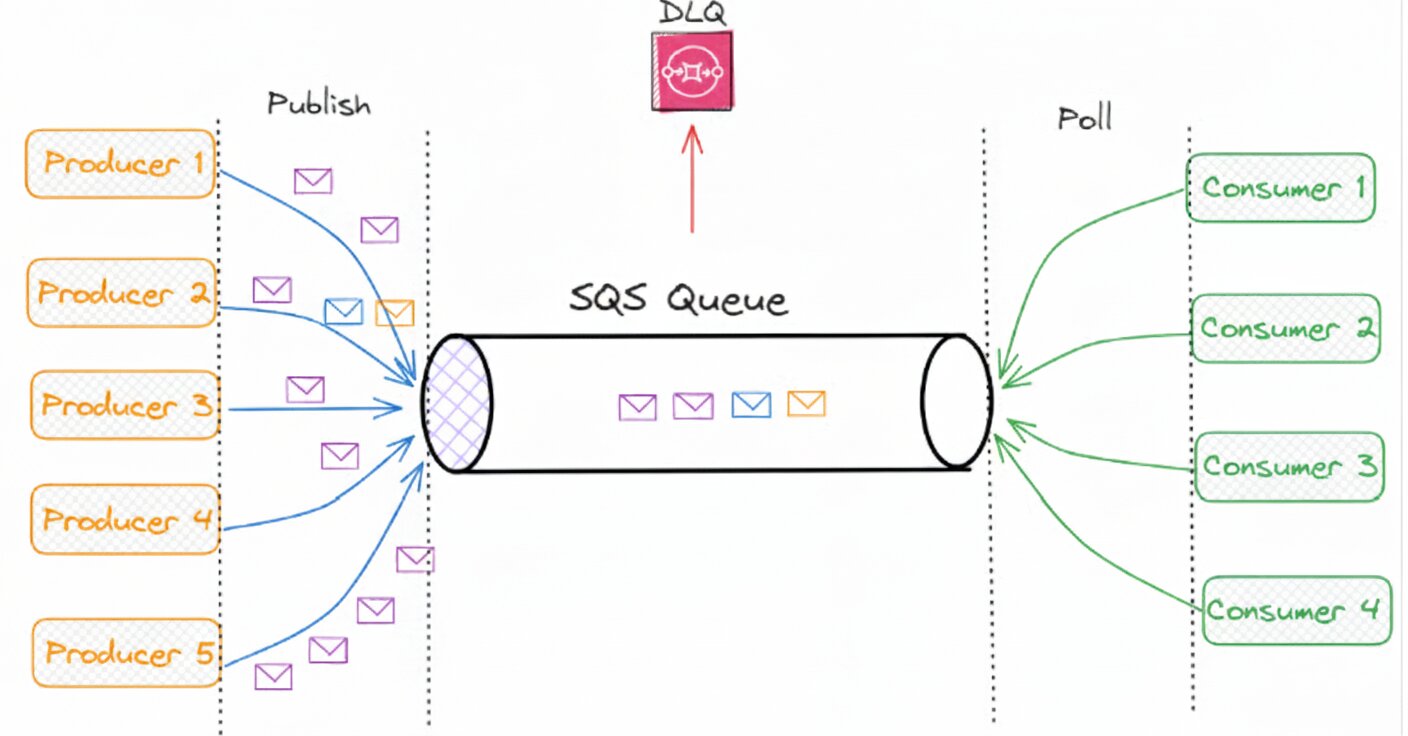
SQS Architecture Flow
Step 1: Send Message (Producer → Queue)
When a Producer sends a message:
- SQS stores it durably.
- A unique Message ID is generated for each message.
- The message becomes “Available” in the Queue.
Step 2: Long Polling / Short Polling
The Consumer checks for new messages in the Queue in two ways:
Short Polling: Scans only a subset of the Queue. It is fast but not always accurate.
Long Polling (The Best Method): The Consumer waits up to 20 seconds for a new message.
- This results in fewer API calls
- Saves costs
- Reduces latency.
Step 3: Receive Message + Visibility Timeout begins
When a Consumer reads a message, the message becomes “invisible.” This is called the Visibility Timeout. During this time:
- No other consumer can see the same message.
- The Consumer gets time to process the message.
Default: 30 seconds
Maximum: 12 hours
If the consumer does not delete it in time, the message becomes visible in the queue again.
Step 4: Message Processing
The Consumer performs its task:
- Updating the database
- Sending emails
- Payment processing
- Order confirmation, etc.
Step 5: Delete Message (Success Case)
Once the Consumer successfully completes the task, it sends a DeleteMessage API call to SQS. As a result:
- The message is permanently removed from the Queue.
- It will never be processed again.
Step 6: Retry + Dead-Letter Queue (Failure Case)
If message processing fails, SQS retries according to its redrive policy. For example:
- 3 times
- 5 times
- 10 times (customizable)
If the limit exceeds, instead of returning to the Queue, the message is sent to the Dead Letter Queue (DLQ). The DLQ is a separate Queue where problematic messages are stored.
Types of SQS Queues
(A) Standard Queue
This is the default and most widely used queue in SQS.
Core Features:
- Unlimited throughput: You can send/receive as many messages as you want.
- At-least-once delivery: A message might be delivered more than once.
- Best-effort ordering: Usually maintains order, but there is no guarantee.
Where to use it?
- Chat message logging
- User activity tracking
- Background job processing
- Bulk email sending
- High-scale systems (ride-sharing, IoT, gaming)
Where exact order is not critical, the Standard queue is perfect.
(B) FIFO Queue (First-In-First-Out)
Where order and exactly-once delivery are critical, FIFO is used.
Core Features:
- Guaranteed ordering: The message that arrives first is processed first.
- Exactly-once processing: The message is processed only once.
- Limited Throughput: Max 3000/per sec (with batching).
Where to use it?
- Payment processing
- Order management
- Stock trading systems
- Inventory updates
- Where a sequence error could cause major problems.
| Feature | Standard Queue | FIFO Queue |
| Message Ordering | Generally messages arrive in sequence, but under very heavy load, the order might be missed. | Fully strict order – the first message comes first, the next one follows. |
| Message Delivery | At-least-once delivery is guaranteed, but there is a possibility of duplicates (based on visibility timeout). | Exactly-once delivery, no duplicates occur. |
| Throughput (TPS) | Nearly unlimited. Works very well in high-traffic systems. | Up to 3000 messages/second per API call, where strict ordering is required. |
| Region Availability | Standard queues are available in all regions where SQS exists. | Available in most regions, including Commercial and GovCloud. |
| AWS Service Compatibility | Compatible with almost all AWS services. | Does not work with all AWS services. |
In short:
- Standard Queue: High speed + high throughput, for tasks where strict ordering isn’t necessary.
- FIFO Queue: Strict ordering + exactly once processing, for payment/order/critical sequences.
AWS SQS Configuration
When we create a Queue, we need to specify certain configurations. Here, we will discuss the AWS SQS configurations in detail.
1. Visibility Timeout
Value: 30 seconds
What is it?
Visibility Timeout is the time period during which a message remains invisible to other consumers after one consumer (like your app) receives it.
How it works:
- Suppose a consumer reads a message.
- For the next 30 seconds, no one else will see that message.
- Within these 30 seconds, the consumer must complete the task and delete the message.
- If the consumer fails to delete the message within 30 seconds, the message becomes visible to others again.
Usage:
- The visibility timeout should be set based on how long the processing takes.
- It can be shorter for small tasks and longer for large tasks.
2. Delivery Delay
Value: 0 seconds
What is it?
Delivery Delay is the time period a message waits after being sent to the queue before it becomes available to consumers.
Example:
If Delay = 10 seconds:
- The message will be in the queue as soon as it is sent,
- But consumers will not be able to see it for 10 seconds.
Usage:
When message processing needs to be delayed for a while, such as in scheduled or delayed jobs.
3. Receive Message Wait Time
Value: 0 seconds
What is it?
This is the time limit for Long Polling.
Explanation:
- 0 seconds means short polling, meaning the consumer checks if there is a message in the queue and returns immediately.
- If you set this to 10–20 seconds, the consumer will wait for that duration (long poll) for a message to arrive.
Usage:
- Long polling reduces costs and makes the queue efficient.
- It is highly effective in high-throughput systems.
4. Message Retention Period
Value: 4 days
What is it?
The Message Retention Period is how long a message will stay in the queue if no one reads or deletes it.
Example:
When Retention = 4 days,
- The message will stay in the queue for 4 days
- If no one reads it, it will be automatically deleted after 4 days.
Usage:
- When messages need to be held for a long time.
- Helpful in low-traffic systems.
5. Maximum Message Size
Value: 256 KB
What is it?
The maximum size allowed for a single message.
Details:
- AWS SQS can hold messages up to 256 KB.
- This can be code, strings, JSON, etc.
Usage:
- To send exceptionally large data, it is better to use S3 and just send the link.
- For driver requests / trip information / event notifications, 256 KB is sufficient.
Let’s now take a look at HOW we used AWS SQS in our Chess Game project
The problem scenario
In our system, we need to send notifications to users for almost all events:
- When a game is created
- When a game ends
- When a new user signs up
- Weekly gameplay statistics
- Tournament notifications
- Rating update requests
- Online gameplay requests
Our solution: AWS SQS
- We created an SQS Producer service. Data is sent to the queue from ProducerService according to the payload.
- We have multiple consumers running as .NET Hosted Background Services.
- Consumers poll the queue, process the messages, and then delete them using the SQS Delete API.
Results
- Scalable & optimized: The system can easily handle large traffic.
- High performance: Rapid message processing is possible by adding new consumers.
- Reliable: Unlimited requests can be accepted using a Standard Queue.
- No duplicate processing: SQS does not send the same message to multiple consumers at the same time.
Takeaway
AWS SQS best practices
To get the maximum benefit from AWS SQS, it is very important to follow some best practices. Here are some key tips for using SQS more effectively:
- Use Long Polling to reduce cost and latency.
- Add a Dead-Letter Queue (DLQ) to handle problematic messages separately.
- Use Batch Operations to reduce API calls and increase performance.
- Configure Queue Access Policy correctly to ensure security.
- Monitor Queue Depth to increase/decrease the number of consumers as needed.
- Use Data Encryption to keep sensitive data secure.
Many of us confuse AWS SQS with AWS SNS, but these two are completely different services. In a future article, we will discuss AWS SNS in detail and clearly compare the two.
Many thanks to Sodipto for this in-depth article. More similar readables can be found on his LinkedIn profile.